

Python: best_practices[1]

Updated: Sep 25, 2021
Write better Python code in the future.
Part 2 of our snippets and learning moments in Python. Topics I recently remembered or picked up. Here is the recollection of all this posts:
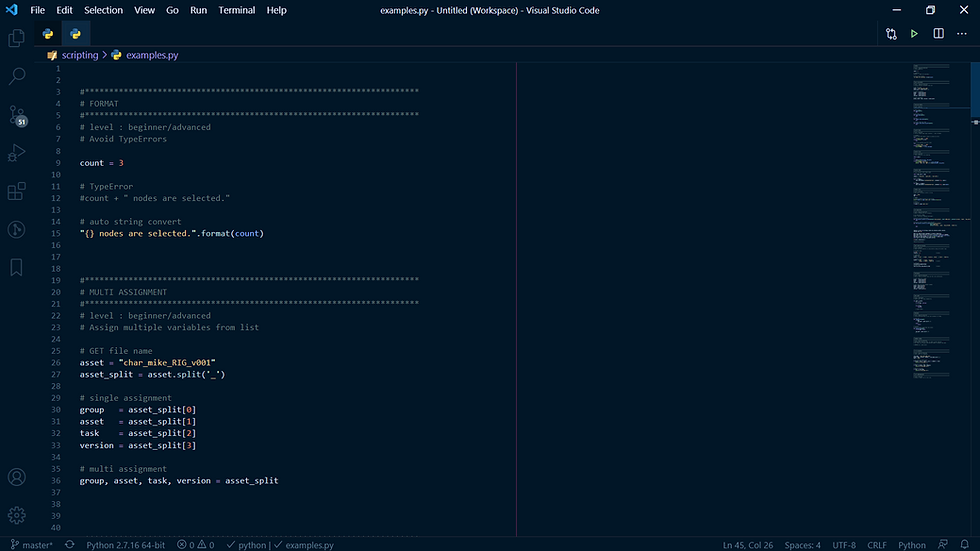
ASSIGN TABLES
Convert your assignments into tables by using spaces.
# fine
group = context['group']
asset = context['asset']
task = context['task']
version = context['version']

# clear table: var | value
group   = context['group']
asset   = context['asset']
task    = context['task']
version = context['version']

# too much
task           = context['task']
version_number = context['version']
ONE-LINER
Simple one liner help readability (not everyone is a fan).
for path in paths:
    # 1 line
    if not path: continue

    # 2 lines
    if not path:
        continue
PRECHECK
return/continue/break in one line instead of if-tabs.
# usual way
def change_path(path):
    if path:
        new_path = path.split('_')
    else:
        return

# precheck
# checks without additional tab levels
def change_path(path):
    if not path: return
    new_path = path.split('_')
IF SEQUENCE
Find a part in a sequence.
file_name = 'char_mike_v001_test'
group, name, version, comment = file_name.split('_')
text = 'mike'

# Too long and complicated
if group == text or name == text or comment == text:
    print('in file_name or')

# Search in list, tuple, set, ...
if text in [group, name, comment]:
    print('in file_name list')

# Search in string
if text in file_name:
    print('In file_name str')
LIST COMPREHENSION
Create a simple list in one line (faster and easier to read ... mostly).
# loop list (3 lines)
squares = []
for nr in range(10):
    squares.append(nr * nr)


# list comprehension
# one line - still easy to read
squares = [nr * nr for nr in range(10)]
# [0, 1, 4, 9, 16, 25, 36, 49, 64, 81]
DOCSTRING
Explain important processes in more detail.
This is a must in complex scripts and on a professional pipeline TD level.
def rename_read_nodes(name, read_nodes):
    """ Renames all given read nodes while adding count.

    Args:
        name [str]: future name added with a count e.g. bg_001
        read_nodes [list]: Nuke read nodes

    Return:
        [bool]: success
    """
    # process rename read_nodes
    return True
UNICODE
Unicode aims to list every character used by human languages.
# ASCII is the old character encoding standard used by default
# Limited range of characters
print('This is a normal message.')

# Unicode with e.g. German Umlaute
print('mögen - gären - süß')

# Defining the encoding standard (PEP 263)
# by using this comment at the beginning of the file
# -*- coding: utf-8 -*-
IMPLICIT IF
Implicitly exists or not.
path = ""

# explicit empty path/string
if path == "":
    print("No path")

# implicit empty path
if not path:
    print("No path")

# implicit existing path
if path:
    print("Path is {}".format(path))
PSEUDO CODE
Note your script step by step before filling out the blanks.
# GET selected nodes

# FIND all assets that start with "char_"

    # DELETE char asset
CONSTANTS
Constants are UPPERCASE variables which never change.
# UPPERCASE indicates constants which are defined in the beginning
# but are never overwritten.
PROJECT_PATH = '/project/'
RESOLUTION = [1920, 1080]
- Alex
PS. For more content subscribe to my Newsletter.

mình có lần lướt đọc mấy trao đổi trên mạng شيخ روحاني thì thấy nhắc nên cũng tò mò mở ra xem thử cho biết. mình không tìm hiểu sâu chỉ xem qua trong thời gian ngắn để quan sát bố cục cách sắp xếp جلب الحبيب các mục và trình bày nội جلب الحبيب dung tổng thể. cảm giác là các phần được trình bày khá gọn, các hurentest berlin mục rõ ràng nên đọc lướt cũng không bị rối với mình như berlinintim vậy là đủ để nắm tin cơ bản rồi. جلب الحبيب
I've been exploring this topic, and the approach in ZEnhancer really aligns with that idea of creating a more focused and intentional digital space. It's a helpful reminder to audit our own online habits.
The article highlights the real-world challenge of balancing a client's clear vision with a tight budget. Using a grid maker for initial space planning could be a practical way to explore layout options within those constraints.
Really enjoyed this take. I’ve been following the game’s development closely, and it’s cool to see how the open-world systems are shaping up—definitely a lot to dig into over at the Neverness to Everness Wiki.
I found your insights on this really helpful, especially the way you broke down the user interaction flow. I actually came across a similar breakdown on ScopeQuill that goes into the backend logic behind these chat widgets.